New Instructor App Launches, Faster and Easier Than Ever
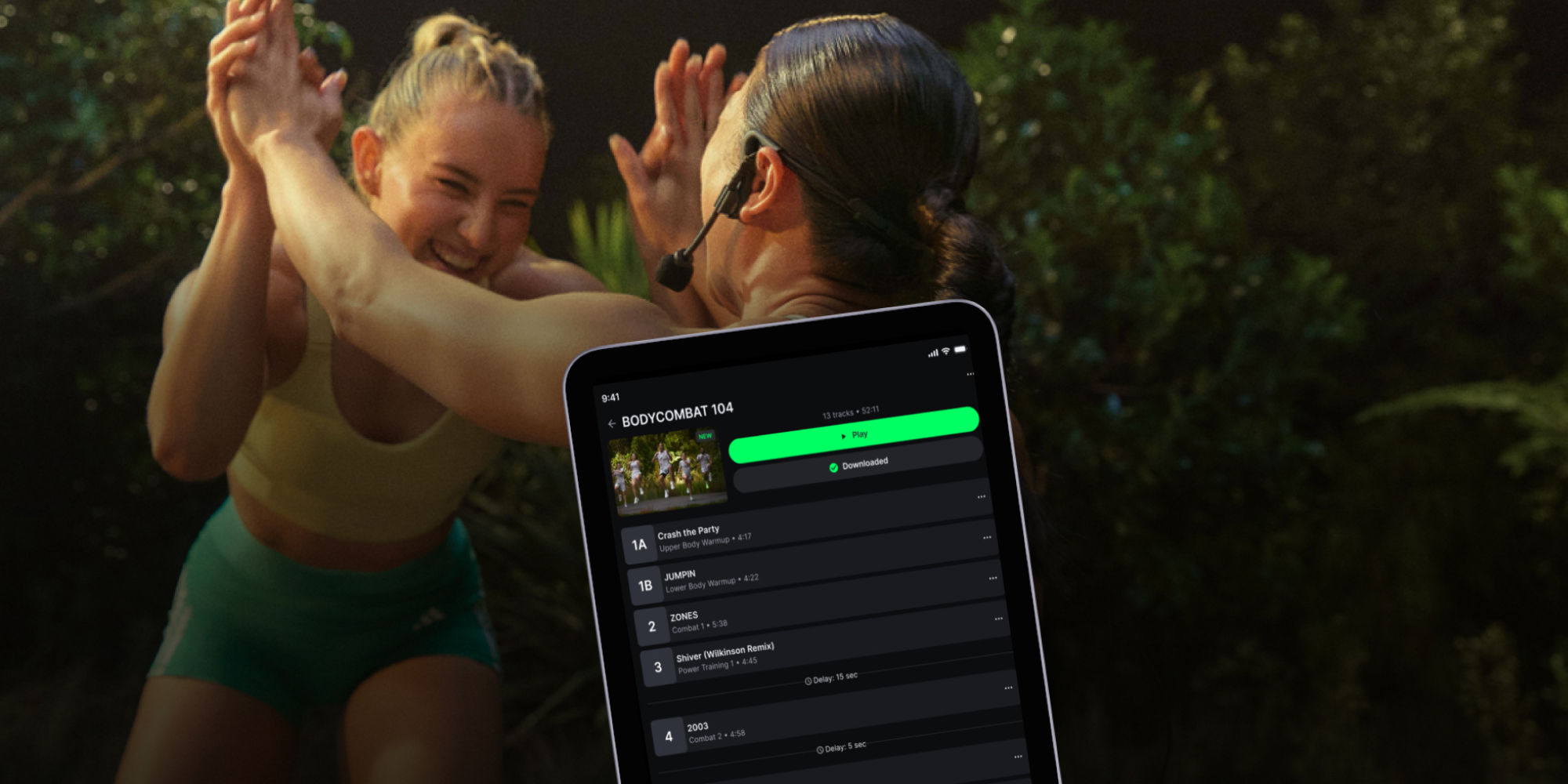
The new Les Mills Instructor App is designed to make learning releases and teaching classes faster, easier, and more reliable. Senior Product Manager Alice Liang explains what's changing, why Les Mills is replacing the current Releases App, and how Instructors can reap the benefits.

What is the new Les Mills Instructor App?
Designed around the realities of everyday teaching, the app makes it easier for Instructors to access Masterclasses, playlists, choreography notes, and learning resources. The current Releases App and the new Instructor App will run alongside each other for a period of time before the Releases App is eventually retired.
Why is Les Mills replacing the Releases App?
We've heard consistent feedback from Instructors through surveys and one-to-one interviews that the current app isn't always stable enough to teach with. While many Instructors have had a positive experience, the feedback around reliability was too frequent to ignore.
We also know it's frustrating to move between multiple platforms to find what you need. The new Instructor App is the first step toward creating a single destination where Instructors can access all the tools and resources they rely on most.
What are the key improvements?
Early-access feedback from the TAP (Trainer, Assessor, Presenter) team has been overwhelmingly positive, with Instructors describing the experience as smoother, faster, and easier to use.
The app has been redesigned around the tasks Instructors perform most often. For example, a dedicated Downloads tab provides direct, reliable access to offline playlists, Masterclasses, and choreography notes, eliminating pre-class anxiety.

Other key improvements include:
- Faster, more reliable performance, with a modern interface
- Simplified bottom-bar navigation: Masterclasses, Playlists, Downloads, and Training
- Dedicated offline mode that detects when you're disconnected and keeps your class moving
- Streamlined playlist creation with one-tap copying and instant track swapping
- Better overall teaching and learning experience
It won’t end there, either. The app rolling out now is a beta version, so you can expect further updates as the experience evolves.
"A fabulous new feature is the ability to speed up playback, which will be super useful for recapping choreography."
How does the new Les Mills Instructor App improve learning and teaching?
The new Instructor App gives Instructors complete control over how they prepare and deliver classes, and the modern layout cuts down prep time so you can focus on teaching.
New learning and teaching features include:
Effortless video navigation: Jump straight to any track chapter or practice section instantly.
Voices on/off toggle: Turn Presenter vocals on or off directly within the video player.
Variable playback speeds: Slow down or speed up Masterclasses to learn complex choreography at your own pace.
Background audio playback: Keep your music or Masterclass audio running even when the app is minimized.
Full-screen player with countdown timer: Large, clear countdown displays let you track timing at a glance while teaching.
In-player PDF tools & subtitles: Print PDF choreography notes directly from your mobile device and toggle subtitles on demand.
You might notice that ‘Learn’ content isn’t available. The team is working to bring this into the new app, along with other improvements, during the beta period.

Where can Instructors find Masterclasses, playlists, and choreography notes?
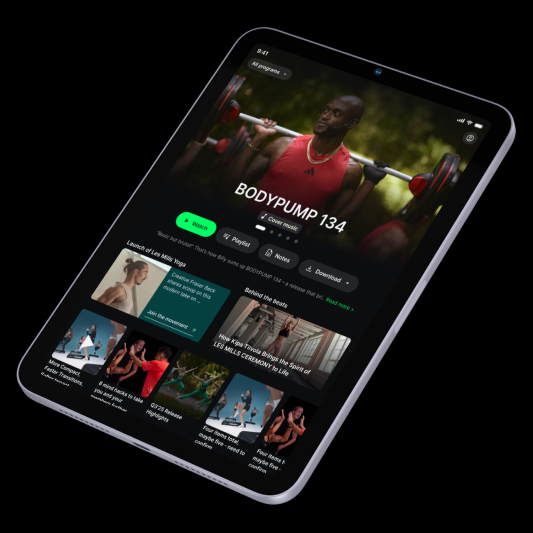
When you log in, you land directly on the Masterclass tab, your central home screen. From here, you can watch the latest release videos, access choreography notes, read curated articles, and explore program content.
The other main tabs include:
Playlists: Access your full music library, browse complete release tracklists, and build custom mixes with track timings visible at a glance.
Downloads: Find all your saved playlists, Masterclass videos, and notes organized in one dedicated place for seamless offline access.
Training: Quick access to your ongoing education and Instructor resources.
The team is already working on additional improvements, during this beta period.
"This is awesome. As an Instructor, we can actually see it straight away because if we're looking for a specific track that needs to be a certain length, we can see it at a glance without having to open each track individually."
Will existing releases and playlists transfer to the new app?
Yes. You can log in using your existing username and password to access the same programs, releases, and playlists available in the Releases App. When you first sign in, your playlists will automatically migrate to the new Instructor App. This usually takes only a few seconds, depending on how many playlists you have.
The migration only happens once. We encourage you to transition to the new app once your playlists have migrated. Any playlists created later in the Releases App won't be transferred automatically.
How do you get started with the new Les Mills Instructor App?
Getting started is simple:
- Download the beta app from the App Store or Google Play Store when it becomes available in your market.
- Log in using your existing Les Mills email address and password.
- Access your releases, playlists, and learning resources.
- Start using the beta app for release preparation and teaching.
There's no need to create a new account.
When will the new Les Mills Instructor App be available?
The new Instructor App is being rolled out to Instructors globally in phases. Once it's available in your market, you'll receive an email with everything you need to get started.

At a glance: key features
Faster, more reliable performance
Masterclasses, playlists, and choreography notes in one place
Enhanced learning tools and video controls
Custom playlist creation and management
Offline downloads for teaching anywhere
Browse and filter by program
Built-in learning content, news, and updates
Easy transition with playlist migration and existing login details
"In the old app, I always had to check what I'd downloaded. I like that it's really obvious here in one place."
For more information, head to our dedicated page
More about the author
Jonathan Tustain
Jonathan is a Digital Content Producer at Les Mills International, where he develops and delivers content for Instructors across the Les Mills website and app. His role focuses on creating useful, engaging content that supports Instructors and strengthens their connection to the Les Mills community.
With a background spanning media, fitness and digital content, Jonathan has written for publications including Gym Owner Monthly and How It Works, and has developed and delivered industry events including The Future of Fitness. He has also spoken at major international events and organisations including MIPCOM, MIPTV, GSMA, Hubei TV and NYU Abu Dhabi.
Jonathan brings together editorial, creative and strategic experience to explore new ways of communicating with fitness professionals and creating content that is relevant, engaging and useful to Instructors around the world.


Instructor News
Kylie Gates on building a fitness career that lasts


Instructor News
The Real Lives of Les Mills Instructors Part 3

Instructor News
The Real Lives of Les Mills Instructors Part 2
Instructor News
Teaching LES MILLS REFORMER™: Instructor Insights

Instructor News
Les Mills Q3 ’26 Release Highlights: What’s New

Instructor News